Posts Tagged: ‘Ranting’

More Things I Hate About Technology – Originally Published May 2018

May 13, 2018 Posted by Tiny

A Pain in the Whatchamacallit
By Tiny Ruisch

Way back in October 2009, I wrote an article about things I hate about technology.  I’m not going to regurgitate the whole thing, but I will say that I still hate: 1) having to use several different types of USB cords and connectors; 2) End User License Agreements; 3) SPAM and forwarded e‑mails; and 4) buying a water filter for my refrigerator.

In fact, buying a water filter is what caused this months rant.  I recently went to a popular home store to buy a new filter for my Whirlpool refrigerator.  This is the same one I owned back in 2009.  After that experience, I learned to keep a file in my Evernote account listing serial numbers, product codes, manufacturer information, and most importantly, replacement part numbers.  The only problem, none of the numbers on the filters in the store matched the one I needed.  It turned out that the filter manufacturer had changed the numbering system.  The employee told me I should have brought the old filter in to the store.  I asked why since I had the number.  They were polite, looked up the new number on their fancy computer and promptly sold me the wrong filter.  After another trip the next day, I got the correct filter.  I have noticed this problem on many other items in the past.  I wonder if manufacturers think that people will buy the wrong part and just lose their money?

Maybe hate is to strong of a word, but I’ve always disliked how companies almost always have to use a proprietary document format.  The perfect example is word processing.  Why must each program have a different extension?  Is it good for business to make consumers remember “.doc”. “.odf’, “.wps”, “.docx”, “.odt”, “.txt”, “.rtf”, “.abw”, “.abi” and hundreds of others?  Almost all word processing software has a save as feature to convert files to other formats.  They can’t be that much different.  Why isn’t there a standard where all programs save in a standard format?  After all, this idea seems to work pretty well for HTML internet files.

Have you ever heard how technology brings the world closer together?  Facebook, Twitter, Snapchat and many other social networks supposedly are the main reason.  Personally, I dislike how technology does the opposite.  Have you ever been in a conversation and the other person is busy fiddling with an electronic device?  Did you ever notice that many younger people don’t have simple skills like making change, telling time, following a map, etc.  These and many more are because they rely on technology too much.  I would suggest that we are moving farther apart.

I guess that I’ve done enough complaining for this month.

Thanks for reading.
I Never Click a Facebook Link

December 9, 2017 Posted by Tiny

A Facebook Rant

I’m not the typical Facebook user.  I seldom sign on more than once a day, usually for less than twenty minutes.  I just check the news feed to see what kind of pickles my nieces are eating.  My friends list is about fifty people.  After each session, I log out and delete cookies.  This is to prevent Facebook from tracking me everywhere on the internet.

I don’t make make many posts.  Besides trying not to miss wishing birthday greetings and occasional (usually snide) comments, most of my posts are links to Snopes and other sites refuting many of the untruths posted on Facebook.  Of course, this educational policy of mine doesn’t stop too many people from continuing to share unsafe sites.

I’m not going to write a rant about how Facebook encourages people to share bogus fake prize sites, giveaway scams, fake videos, like farming scams, the ever present can I get 1000 shares or the many other scams.  If you do a search, you can find thousands of articles that other people have written and posted on the internet.

My Facebook policy is simple.  I don’t EVER click any links on Facebook.  If I see something that I’m curious about, I open another browser and do a separate search for it.  I will admit that I often chuckle when somebody posts that something wrong is with their computer, tablet, phone, etc.  It is obvious to me that they don’t follow my advice: DON’T EVER CLICK ON A FACEBOOK LINK.

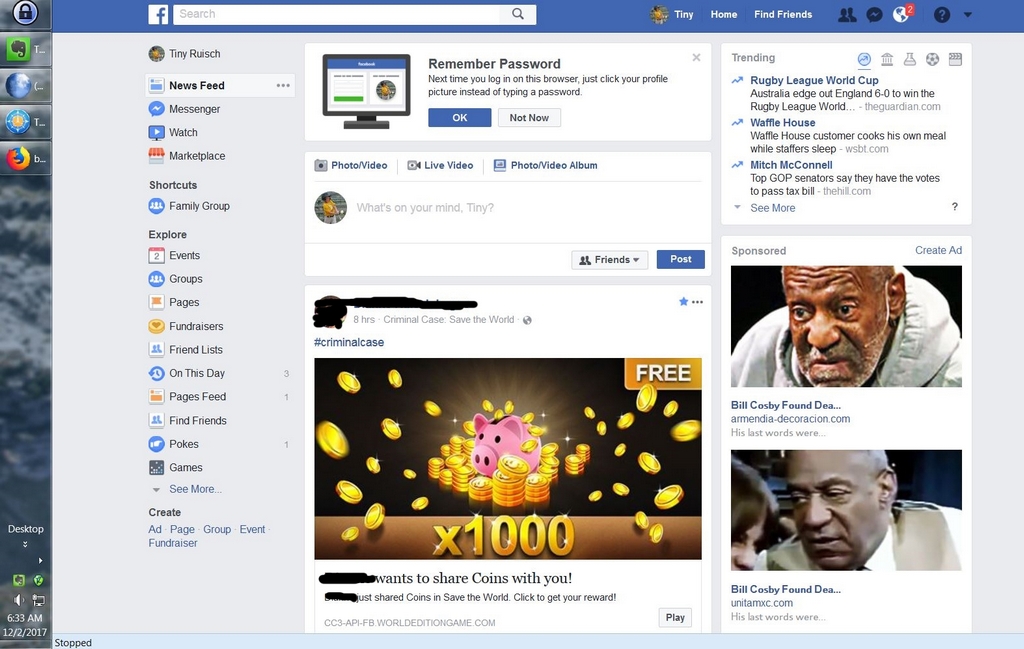
I’m not even going to talk about how Facebook never posts ads that are false (assuming the Russian ads about our President were true).  Instead I’m going to upload a screenshot I recently made.  I’ve blacked out friends names in my feed.

You can see in my task bar calendar that this happened on December 2, 2017 at 6:33 am.  Do you notice the two sponsored ads in the upper right that are both telling me that Bill Cosby is dead?  The ads are from two different companies.  I checked out both sites.  They are both Spanish language.  One appears to be selling uniforms and the other interior decorations.  I suspect that the two ads urging me to learn more about Bill Cosby’s death might not be real.

Thank you Facebook for keeping me safe.

Screen Shot – Click to Enlarge

Leaning Towards Linux – Originally Published August 2017

August 8, 2017 Posted by Tiny

From the Dark Side
by Tiny Ruisch

Tom wrote an article for the Newsletter titled “More Microsoft Aggravations”.  I’ll state for the record that I am not in total agreement with him.  I’m leaning towards being much more maddened than he is.  It has been slowly building up for two years now.  I’ll be happy to tell you why.

Windows 10 was released on July 29, 2015.  At that time I was running Windows 7 Professional on my desktop, Windows 7 Home on my laptop, Windows XP on an old desktop that I was using as a server, Windows 8.1 on a tablet, an older laptop with Linux Ubuntu and a laptop with the Windows 10 beta test (the club may remember me demonstrating the new OS with this machine in August 2015).  With the exception of the tablet, I used all the machines almost daily.

I decided that I wasn’t going to upgrade my Windows 7 machines.  This was partly because they were (and still are) both aging and I didn’t think Windows 10 would work well on them.  Besides, I had spent seven years getting my desktop setup just the way I like it.  Being only five years old, my laptop wasn’t quite so ancient.  I still think I made the correct decision as both machines still run fairly well.  In the past, I’ve written several articles on my maintenance and upkeep procedures.

With the release of Windows 10, Microsoft changed their marketing strategies.  It wasn’t long before they released the (in)famous GWX update that attempted to install the new operating system on every computer in the world.  There was a lot of deceit and trickery involved.  Many people had a new OS installed even if they didn’t want it.

In the intervening two years I’ve purchased the Nextbook 11, a convertible tablet.  It runs Windows 10 home and works well for my portability needs.  My Windows 7 desktop and laptop are still my two main productivity machines.  The laptop with the Windows 10 fast ring sits unused waiting for me to put a linux distribution on it.  I’m thinking of turning it into a media server.

I find myself getting more upset with the Microsoft Windows world almost every day.  I can’t say that there is any single, glaring thing, but instead a bunch of small aggravations.

  • Updates install programs that I don’t want or need.
  • Updates remove programs that I use.
  • File associations getting changed.
  • Getting unwanted advertisements (oops! Notifications).
  • Difficulty in navigating Windows settings.
  • Not having control over my hardware drivers.

These are just a few of the most noticeable gripes that I have.  It doesn’t appear that things will improve in the near future.  Maybe I will be surprised, but I’m thinking that things will get worse before they get better.

Linux is looking better every day.

Thanks for reading.

Brand Loyalty – Originally Published November 2016

November 6, 2016 Posted by Tiny

A Pain in the Whatchamacallit
By Tiny Ruisch

Four years ago, in October of 2012, I wrote an article about companies that I won’t do business with if I can avoid it.  You might recall my vitriol towards the Sony Corporation for the evil they did by installing a root kit on my computer.  I still haven’t forgiven them and likely never will.  I’ll just smirk when they get hacked again.

Instead, I’m going to talk about some other companies that haven’t done a very good job of retaining customer loyalty.  Some have a long track record of errors and I’m surprised that they have stayed in business.  Others probably will not go out of business but probably should.

Yahoo! has recently been sold again (maybe) to Verizon.  This is a company that once was once the most popular website in the U. S.  Once worth over $100 billion dollars, it started to decline about fifteen years ago.  Verizon is reportedly going to purchase it for about $5 billion.  Over the years, Yahoo! Missed out on chances to buy Twitter, Facebook, Google and YouTube.  The latest news is the hack of more than 500 million user accounts.  Rather than inform customers, the company didn’t do anything for two years.  They must be lousy hackers, since Yahoo! has between 2 and 3 billion users.  I think we’ll be hearing more in the future.  I don’t have to worry.  I deleted my account about five years ago.

Another company recently in the news is Samsung.  If you haven’t heard about the Galaxy Note 7 problems, I hope you’re enjoying your vacation on Mars.  I think that Samsung initially did a great job of responding to the exploding battery reports by recalling all of the phones, no questions asked.  Now it appears that the replacement phones are having the same problem.  As I write this article, Samsung has ceased sales of the device.  I don’t think the story is over yet.

I could write several pages on how badly Sony has treated their customers over the years.  If you are interested, feel free to do a search on my website and review my past thoughts.  They haven’t changed.

There are many companies that unfortunately are able to stay in business even though they don’t give a rat’s you know what about their customers.  I’m mainly thinking of communications companies.  Have you heard of any positive customer service stories about ComCast, AT&T, Verizon, etc?  I have.  They almost always get a lot better whenever some competition enters the market.  Often they end up buying the new companies, take a market loss and then return to their past ways.

It is beginning to look like we might soon lose other organizations.  Both of our major political parties are in danger of putting themselves out of business.  Neither bear much resemblance to their roots.  Maybe it is time to resurrect the Whig or Federalist Parties.  We could also turn to the Dixiecrats, the Progressives or the Natural Law Party.  The Know-Nothing Party could be the most appropriate choice.

Thanks for reading.

Things I Won’t Be Spending Money On – Originally Published August 2016

August 7, 2016 Posted by Tiny

A Pain in the Whatchamacallit
By Tiny Ruisch

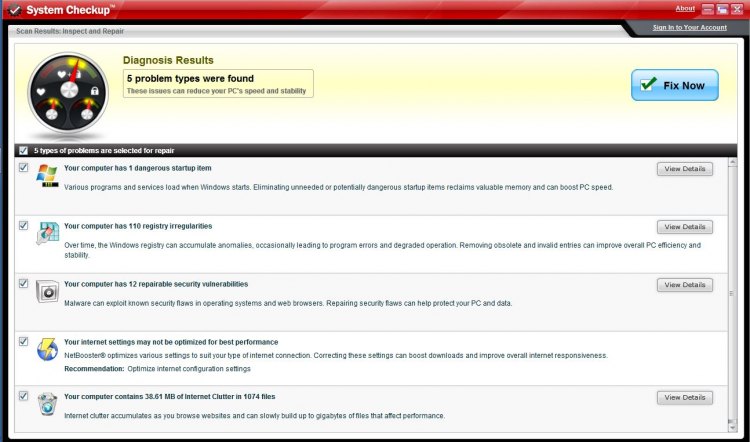
I was watching television when an advertisement was aired for My Clean PC.  My first thought was that this might make a pretty good Whatchamacallit topic for the club newsletter.  I opened a virtual desktop and went to the My Clean PC website.  Bravely I ignored the Web Of Trust warning and enabled all scripting.  I downloaded and ran the free diagnostic tool.  Oh No!  My computer has a dangerous start up item, 110 registry irregularities and 12 repairable security vulnerabilities.  My internet settings aren’t optimized and there is 38.61 MB of internet clutter.

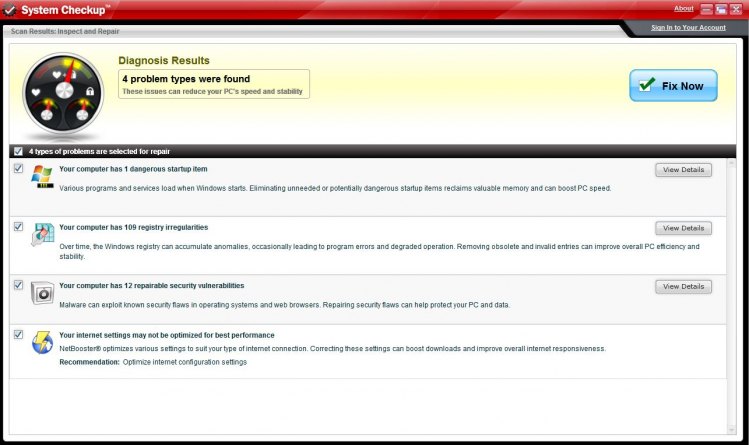
I restarted my computer and ran Wise Registry Cleaner and CCleaner.  Then I opened another virtual desktop and downloaded the diagnostic tool again.  This time there were only 109 registry irregularities.  I wonder if Wise isn’t as good as I thought?  It looks like CCleaner did a fine job.  My internet clutter is all gone.

The dangerous start up item was HPservice.exe.  The diagnostic tool didn’t tell me how it would improve my internet settings.  All of the security vulnerabilities were related to Internet Explorer.  Not only would I never spend money on the technology, but I’d advise you not to purchase any of these types of programs you might see advertised.

My Clean PC isn’t the only technology that I’ll probably never spend my money on.  I haven’t had a land line telephone for more than ten years.  I don’t know how much telephone service costs these days, but I’m sure I’ve saved thousands of dollars.  I know I’m missing out on enhanced 911.  E911 wasn’t mandated until 1999, so I’ve lived most of my life without it.  I know I’m missing out on crisp, clear calls that don’t get dropped, even though I seldom talk on the phone.  The only thing I really miss about a land line is the satisfaction of slamming down the phone when I’m really mad at someone.

I will probably never spend any money on a 3D printer.  I really like the technology and think it would be cool to be able to print some items.  Then I get realistic and realize that I really haven’t any practical use for it.  I seldom print anything any more.  After all these years I still haven’t any need for a laser printer.  Maybe when three dimensional print advances enough that I can print a cheeseburger, I’ll rethink the issue.

If you’ve read any of my previous articles, you already know that I won’t be spending any money on Sony technology of any kind.  I won’t bore you again with my reasons, but will just restate Sony is not very reliable in their security.

Even though qualify as a senior, I won’t spend any money on technology that is designed specifically for “seniors”.  I have found that most of this stuff is mostly overpriced and outdated.  If I find I should need a keyboard with big lighted keys, I know I’ll be able to find one on Amazon or Newegg for about a third of the price.  I still haven’t figured out why anyone would buy a computer just to keep up with what their grandchildren are doing.  The answer is that they are probably busy hacking their grandparents computer.

I doubt if any of my dollars will ever be spent on a “smart” watch.  I just can’t see the need for having technology that doesn’t really do anything.  All that a smart watch really does is interface with a computer.     It is more of a small monitor on your wrist than anything else.  How many do you actually see whenever you are in a crowded area.  I don’t even need one for telling time.  When I retired from the Navy in 1989, I took off my watch and I never put one back on again.

Now that I’ve saved all of that money my by not buying useless technology, I can finally afford to buy that new computerized toilet seat.  Do you know the one I mean?  It connects to your phone via Bluetooth and you can adjust the temperature of the seat.  There are a couple of speakers built in to the seat lid so you can listen to your favorite music while sitting in the bathroom.  I’m pretty sure that future updates will feature technology that will tell you when it is time to change the paper roll.

Thanks for reading.

Is Windows 10 Really New? – Originally Published July 2016

July 3, 2016 Posted by Tiny

A Pain in the Whatchamacallit
By Tiny Ruisch

Is Windows 10 really a new operating system?  If it is why do new security updates apply to all versions of Windows?  Shouldn’t they either only have to update older versions or just Windows 10.  I’m starting to believe that Windows 10 is really Windows 8,  7, Vista, Millennium and maybe even 98.  Could it be that all they’ve done is change the interface and add some new features?

From the Microsoft website: “Windows 10 is full of new features and improvements.  Take a look at the highlights!”  This is where we first find out that the Start Menu is back.  It was removed for the last version.  Is it a feature that has been restored, or is it really new in Windows  10?

The next paragraph lets us know about the great apps in the Windows Store.  There isn’t any mention of the Store being released with Windows 8.  Might be improved, but it sure isn’t new.

Next up on the new list is something that is actually almost new.  Cortana is Microsoft’s personal voice assistant.  New might or might not be the right description.  You might remember several years ago when I gave a demonstration on voice recognition in Windows.  Dragon’s Naturally Speaking has been around since 1997.  By the way, Cortana is only available in seven countries.

“Microsoft Edge is the first browser that lets you take notes, write, doodle, and highlight directly on web pages.  Use the reading list to save your favorite articles for later, then read them in reading view.  Hover over open tabs to preview them, and bring your favorites and reading list with you when you use Microsoft Edge on another device.  Plus, Cortana is built in to Microsoft Edge to help you do things faster and easier.”  Don’t you think it is kind of amusing that the company is extolling a web browser as the best thing about a “new” operating system?

Next on the whats new list is Windows Hello.  You can use facial recognition or a fingerprint reader to log into Windows.  Once again, a new feature that isn’t new.  Yawn.

Microsoft is telling us that we can use the enhanced Photo App to create photo albums, organize photo folders and sub-folders, share them in e-mail and post them to social media.  Once again, nothing new in the operating system.

King Solomon said “What has been will be again, what has been done will be done again.  There is nothing new under the sun.”  It seems to me that he was right.
Thanks for reading.

Microsoft, What Are You Doing? – Originally Published June 2016

May 26, 2016 Posted by Tiny

A Pain in the Whatchamacallit
By Tiny Ruisch

What are you doing Microsoft?  In the last few days, almost all of the headlines on tech news sites were about the Chrome Browser replacing Internet Explorer as the most used browser.  Even though I don’t use IE very much, I became even more concerned when I read the the usage statistics include Microsoft’s new Edge browser in the totals.  This means that IE has slipped even more that the totals reflect.  Of course, one of the main reasons IE ever had such a high usage is because it has always been the Windows Operating System Default browser.  With the past years push by Microsoft to update users to Windows 10, they can no longer use what has been the dominant browser.

I’ve written in the past my reasons for not installing Windows 10 on any of my main computers.  Not only is the OS still not stable enough for me to trust with my daily use machines, I have no desire to install it on my old hardware.  I do have it installed on two machines and it works great, when it works.  It seems that about every other update messes up my settings, uninstalls some of my software or does some other niggling thing that makes me utter a few bad words.

I’m not planning to ever install Windows 10 on my two Windows 7 machines.  Aside from my hardware concerns, I’ve got them both running exactly like I want.  The only thing I don’t like about them is that I’ve had to disable Windows update.  Once a week or so, I check for updates and carefully scrutinize them before I install.  I don’t want to install a new operating system by accident.

Four years ago, in July of 2012, I wrote an article for the newsletter explaining why I switched from a Windows phone to an Android.  Since then, all of my mobile devices have had Android Operating Systems.  It looks like I was ahead of the times.  Today, Windows Mobile is around four percent and sliding lower.  Do you suppose this might be the result of many users like myself?  Customers get tired of waiting and move on.  The problem is that they often don’t move back.

I think the same thing is starting to happen with the Windows desktop/laptop Operating Systems.  A slow slide into oblivion.  Although there are no real accurate statistics, it isn’t hard to guess that Linux, Chrome OS and others are increasing in use.  Could this be happening because of Microsoft’s “strong arm” tactics to get everyone to use Windows 10?  Only time will tell, but I’d bet that many people are like me, using Linux more and more.

I will probably never know whether I am right or wrong, but I am starting to believe that in twenty years or so tech writers will only be writing about the history of Microsoft.  It’s not anything new in the technology world.  Just think of Commodore, Gateway, Lotus 123, Netscape, IBM, WordPerfect, AOL, Yahoo!, Motorola, Blackberry, Polaroid and many others.  Will Microsoft one day be just a footnote in the history books?

Thanks for reading.

Over Datified – Originally Published May 2016

May 8, 2016 Posted by Tiny

A Pain in the Whatchamacallit
By Tiny Ruisch

Tell the truth now!  How many pictures do you have on your disk drive?  When was the last time you actually looked at most of them?  How many files do you have in your documents (and other) folders that you haven’t opened in the last year?  How many USB Flash Drives do you have filled with stuff you don’t ever use?

In this short article, I’m not going to tell you how to clean up those messes.  I’m just going to tell you why I think we are getting “over‑datafied”.  No you won’t find “over-datified” in the dictionary.  I made it up, but maybe it should be!

In this modern day and age, we are constantly being tracked.  Information about our habits are being stored on web servers everywhere.  Law enforcement agencies, business and many other organizations keep track of where we are, what we do and what we buy.  We hear almost daily about the potential harm that may befall us because of all the data mining.  For the most part, I don’t think that really happens very much.

What does happen is the data is often used to better our lives.  Isn’t it nice to just say, “OK Google” and almost immediately find out anything you might want to know.  I personally like it when my pocket computer beeps and tells me that it is time to leave if I don’t want to be late for a club meeting.  I like the fact that the library program suggests books that I might enjoy to reading.  In fact, that is how data mining is supposed to work.  We share information about ourselves and that information is used to make our lives better.

The problem is that I think we are getting to the point where there is just too much data.  There are thousands of apps you can download to your phone that access many data bases.  Do we really need to know where all the bathrooms within fifty miles are?  Is it necessary to keep track of how much coffee is left in the pot?

You can search the WWW and find a database for anything and everything.  We’re definitely “over‑datafied” when we can find out that women blink more than men, that Americans eat more than 100 acres of pizza every day, Vermont has more cows than people or that ingrown toenails are hereditary.

You can’t get through the day without being inundated with useless data.  Just listen to the nightly news.  Twenty-eight percent of the stories have a percentage fact in the story.  Oh well!  I guess there is nothing we can do about being “over‑datafied”.  Now you’ll have to excuse me while I edit the data charts for next months newsletter.

Thanks for reading.

KB3035583 – Originally Published August 2015

August 8, 2015 Posted by Tiny

A Pain in the Whatchamacallit
By Tiny Ruisch

KB3035583 was recently resurrected on my Windows update list as an important update.  It has been making me think a lot about Microsoft and Windows 10.  In fact, I’m having second thoughts about whether I want Windows 10 an any of my primary computers.

This patch first appeared back in March as an optional update.  It was described as an update that enables additional capabilities for Windows Update notifications when new updates are available for the user.  About a week later, the patch was re-released with a change from optional to recommended.

WOW!  This must really be an important update.  Like so many things in life, it depends on your point of view.  At first, I liked the update. Since then, my viewpoint has changed.

When the update is installed, a new icon appears in the Windows taskbar.  Mousing over the icon reveals the message “Get Windows 10”.  Clicking opens a multi‑page advertisement to reserve your Windows 10 free upgrade.  So far, so good.

After I reserved my free upgrade, the Get Windows 10 icon remained in my taskbar.  No problem at all.  I opened the Control Panel to customize notification area icons.  I changed the GWX (Get Windows Ten) icon to hide icon and notifications.  Problem solved.

A few days later, when I rebooted my computer, I noticed that the GWX icon had returned.  Microsoft changed my customized notifications settings.  Since I’m kind of fussy about unnecessary programs, tasks and services that run on my computers, I uninstalled KB3035583.  Of course, I opened Windows Update and hid the patch.

Since then, the update has shown up two or three times as either an important or recommended update.  It’s like Skype. You can hide it, but not permanently.

Thanks for reading.

More Things I Hate About Computing – Originally Published July 2015

August 6, 2015 Posted by Tiny

A Pain in the Whatchamacallit
By Tiny Ruisch

Way back in 2009, I wrote an article for the newsletter where I ranted on things I hate about computing.  About the only thing that has changed is that I hardly ever get any forwarded e-mails any more.  Of course, it’s probably because hardly anyone uses e-mail these days.  People have found that it’s easier to just hit a “share” button.

Maybe hate is too strong a word, but there are still a lot of things that I really dislike about electronics, computing and the internet. For instance, “click baiting” seems to be getting worse every day. Simply put, click baiting is where an advertiser pays a web site to put in an article with an interesting headline that just turns out to be advertising. If you want to see a lot of click baits, get a Facebook account. Just make sure you hit the share button to pass it on to your friends.
After giving some thought to the subject, I’ve discovered that there are a lot of other things I hate about computers, the internet and electronics in general.  For instance, I really dislike all of the haters.  Microsoft fan boys are always running down Apple while the Apple fans do the same to Microsoft.  Of course, the Linux users are different.  They hate all the other operating systems.  It goes even further.  If you go to a camera forum, you will find Sony, Canon, Olympus, etc. users at each others throats.  Don’t you miss the old days of “FORD: Fix or repair daily”?  Personally, I’d rather fix a Ford than drive a Chevy.

I really dislike software that isn’t user friendly.  Some programs have windows that can’t be re-sized.  I’m getting older and my eyesight isn’t what it used to be.  If I can’t make the window bigger and re-size the font, I likely won’t use the software.  Then there is software that won’t let you choose where to install it.  I don’t install all of my programs into “program files”.  Lots of times, I don’t even install them on the C drive.  I’m not even going to talk about End User Licensing Agreements or unwanted offers.  One of the worst things is a question similar to: “Click this box if you like this article”.  Then you see a yes box with no alternatives.  You can’t continue if you don’t check the box.

I wonder if Microsoft will ever fix one little thing that has bugged me for as long as I remember.  Whenever you use file explorer to copy, move or delete a list of files, Windows makes an estimate of how long it will take.  Wouldn’t it be nice if the estimate was close once in a while.

Isn’t it amazing how many download sites have succumbed to evil ways?  In times past, CNETs download.com was the premier site to get software.  In recent years, the site has become riddled with malware, drive-by downloads, and other unwanted junk.  Source Forge has joined them.  Some days you can’t keep up with the bad stuff.

Since another thing I hate is long winded diatribes from complainers, I’ll just say, “Thanks for reading.”